
CDP vs. CRM: What's the Difference?
Wondering whether your business needs a CDP, a CRM, or both? Compare how each platform works, what it's built for, and how to choose the right fit.


CRMs and CDPs get mentioned in the same breath so often that it's easy to assume they do the same job. They don't. Both deal with customer information and overlap in places, but each is built to solve a different problem. Pick the wrong one for the job, and you could end up with a platform that doesn't address what's actually slowing your teams down.
A customer relationship management (CRM) system helps you keep track of contacts, sales conversations, and service history. A customer data platform (CDP) pulls together information from across your customer touchpoints so your teams can understand behavior across channels and act on it. This article covers how each one works, when you might need one or both, and what to think through before adding a CDP to your stack.
Key takeaways
- A CRM helps your teams manage customer relationships, including contact information, conversations, sales activity, and service history.
- A CDP connects customer data from multiple sources to build profiles you can use for analysis, segmentation, and activation.
- The two categories overlap. What a given platform can actually do depends on the product and how it's set up.
- A CRM may be all you need if your main goal is to organize existing contacts and manage relationship workflows.
- A CDP adds value when you need to connect customer data across systems and coordinate experiences across channels.
What is a CRM?
A CRM is software that helps you organize and manage your interactions with current and potential customers. Think of it as a home base for your customer-facing teams, where contact details, account history, sales opportunities, and service requests all live in one place instead of in scattered spreadsheets and inboxes.
Sales teams lean on a CRM to track leads, log conversations, manage opportunities, and plan follow-ups. Customer service teams use it to see a customer's past requests, so no one has to explain their problem twice. Many CRMs also include marketing tools or integrate with marketing platforms, e-commerce systems, and other business software, though features vary by product.
Picture a sales rep getting ready for a call. They open the prospect's CRM record and see the company, every past conversation, the open opportunity, and the next scheduled follow-up. Instead of scrambling for context, the rep can pick up right where things left off.
What is a CDP?
A customer data platform collects and connects customer data from multiple sources to create unified profiles that other systems and teams can use. Those sources might include your website, mobile app, e-commerce platform, email service, loyalty program, or CRM.
The real power of a CDP lies in the connections. A single customer might browse on their phone, buy on their laptop, and open your emails on a tablet, and each of those systems only sees a sliver of the story. A CDP links that activity back to the same person. Depending on the platform, the identifiers you have, your data quality, and your permissions, it can include both known customer records and anonymous activity. Your teams can then use these profiles to analyze behavior, build audiences, and activate data in connected systems.
For example, a marketing team might combine purchase history from an e-commerce system with recent website activity to spot customers who could be a good fit for a retention offer. The CDP surfaces those signals, but the team still decides what action makes sense and where to deliver it.
CDP vs. CRM: What are the main differences?
Both platforms work with customer data, but they organize it around different needs. A CRM is about managing relationships and supporting customer-facing workflows. A CDP is about connecting data across touchpoints so you can build a fuller picture of each customer and put it to work in other systems.
These are typical roles, not hard lines. CRMs can support marketing and connect to other platforms, and CDPs differ in what data they collect, how they resolve identities, and where they can activate profiles. The clearest way to tell them apart is to look at the question each one is built to answer. A CRM asks, "How should this relationship be managed?" A CDP asks, "What's known about this customer across touchpoints, and how can that information be used?"
The two often work as a pair. A CDP might use CRM data as one input to a broader profile, and selected insights from the CDP might flow back into the CRM or another connected system. Exactly what moves between them, and how fast, depends on your products, integrations, and configuration.
When is a CRM the right fit?
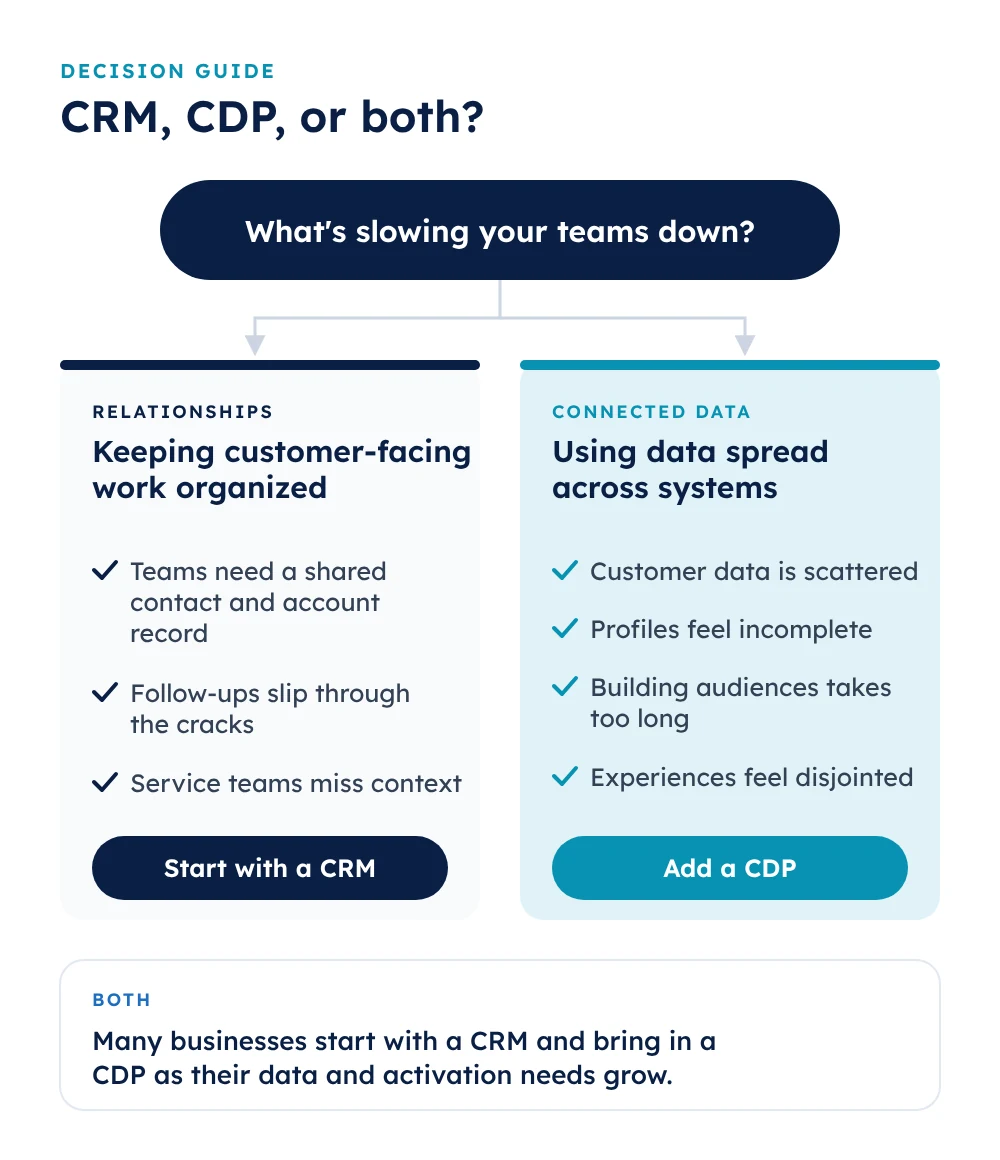
If your biggest headache is keeping customer-facing work organized, a CRM is a strong place to start. It gives your teams a reliable record of who they're talking to, what's already happened, and what needs to happen next.
A CRM may be enough when:
- Your teams need a shared contact and account record. Sales or service staff need quick access to customer details, ownership, and relationship history.
- Follow-ups keep slipping through the cracks. Reps need a dependable way to track conversations, opportunities, tasks, and next steps.
- Service teams are missing context. Staff need visibility into past requests so they can respond consistently.
- Relationship management is the immediate priority. You don't yet need to connect behavior from lots of sources for broader segmentation or activation.
Choosing a CRM now doesn't lock you in. Plenty of businesses start there and bring in a CDP later as their data and activation needs grow.
When does a business need a CDP?
A CDP starts to make sense when your teams are sitting on valuable customer information but can't easily connect it or act on it because it's spread across different systems. At that point, the problem usually isn't storing another contact record. It's getting data from separate touchpoints to tell a single, coherent story.
A CDP may be worth a look when:
- Your customer data is scattered. Information lives across your CRM, e-commerce platform, website, email tools, loyalty system, and elsewhere, making it hard to see how interactions fit together.
- Profiles feel incomplete. Your teams can't easily connect a customer's preferences, purchases, and digital behavior across channels.
- Building audiences takes too long. Marketers wait for manual exports or repeatedly submit requests to technical teams just to create and update segments.
- Experiences feel disjointed. One channel sends a discount on something the customer bought yesterday, while another has the fresher signal that could have prevented it.
- You're leaving first-party data on the table. You want to make better use of the information customers share with you directly or generate through their interactions.
Connecting your data gives your teams more context for relevant engagement, retention efforts, and customer analysis. Just keep expectations grounded: a CDP won't create good data or a winning strategy on its own. The value you get depends on the quality and permissions of your data, the systems you connect, and whether your teams are ready to use the resulting profiles.
How do a CDP and CRM work together?
A CDP and a CRM can each play their own role in the same tech stack. Your CRM might send contact, account, sales, or service information into the CDP. The CDP combines those records with signals from other sources, then makes selected profiles or insights available to other connected systems.
For example, imagine a returning customer contacts support about a recent order, and a few days later, they're browsing a product category on your website. The CRM stores support interactions and order details, while your website captures new browsing activity. On their own, those are two unrelated data points. A CDP can connect them, within your identity rules and permissions, and help your marketing team decide whether a follow-up experience makes sense. That follow-up could land through your email platform, your website, or another connected channel.
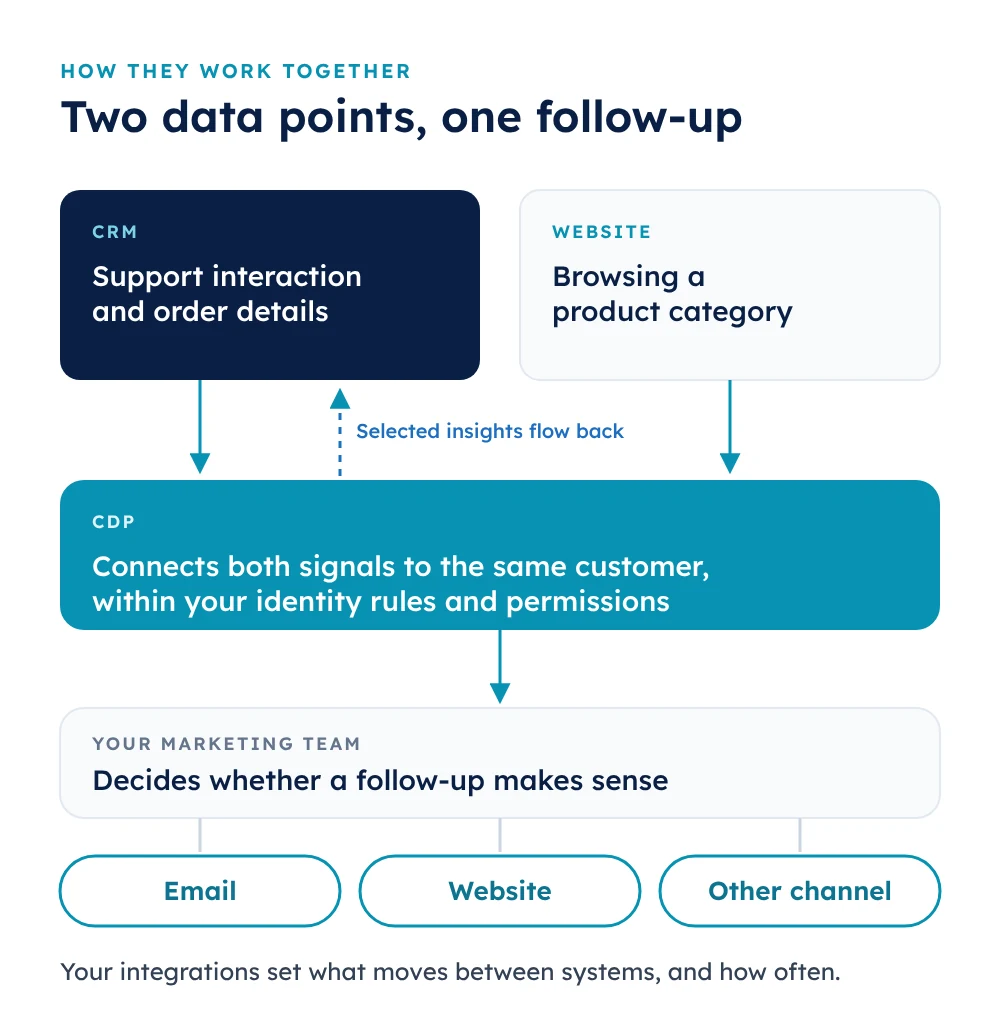
Your integrations determine what data moves between systems and when. Some connections exchange data on a schedule, while others support more frequent or even real-time updates. Data quality, access controls, consent, and customer preferences all shape how the information should be used. Running both platforms can give your teams more connected customer context, but not every business needs to add a CDP right away.
Questions to ask before adding a CDP
It's tempting to jump straight into demos and feature lists. Resist that urge until you've tied the decision to a specific business need. These questions can help you figure out whether a CDP is likely to add value and what you'd need in place to make it work.
1. What outcome should the system support?
Start with the problem you're trying to solve. Is your priority managing accounts and follow-up, building customer segments, personalizing experiences, or analyzing behavior across channels? Decide what progress looks like before you start comparing features.
2. Are your data and permissions ready?
Map out where your customer data lives and where important context tends to get lost along the way. Think about how accurate the data is, who can access it, which customer permissions apply, and what identity rules you'll need to build useful profiles.
3. How will your systems and teams work together?
Figure out which systems need to share data, who will own data quality and access, and which teams will act on the insights. Adding a CDP doesn't mean ripping out your CRM. The goal is to support the work your current stack can't handle well.
How BlueConic connects customer data and action
Plenty of CDPs are good at collecting data. The harder part is doing something with it before the moment passes. BlueConic's CDP is built to close that gap, giving marketing teams a live view of what customers are doing and the ability to act on it themselves, in real time, using the tools already in their stack. If your CRM holds valuable relationship data that never quite makes it into your campaigns, this is where it finally gets put to work.
- Real-time identity resolution. When one customer looks like three different people depending on the tool you open, it's hard to trust your segments. BlueConic matches signals across sources into a single, consistent profile, so you always know who you're actually talking to.
- Profiles and decisions that happen in the moment. BlueConic updates profiles as customers browse, engage, and decide, then determines the next best experience to show them in under a second, rather than waiting on a warehouse sync.
- Campaigns without the IT queue. A no-code interface lets marketers build segments and respond to customer intent directly, without having to file tickets or wait for data exports.
- AI Canvas. Describe a goal, like winning back lapsed customers, and AI agents handle the setup, connections, and configuration to get it live in days rather than weeks.
- More than 150 integrations. Connectors to your ESP, ad platforms, data warehouse, and more mean BlueConic works alongside your CRM and existing tools instead of asking you to rebuild your stack.
Want to see what that looks like in practice? Electrolux linked its website product interest data to its existing customer profiles, then automatically emailed shoppers the moment a product they'd been eyeing dropped in price. The right offer reached the right person at exactly the right time, and in just 30 days, it generated five-figure revenue and an 80%+ jump in conversions. That's the difference between data that sits in a system and data that works for you.
Choose based on your business goals
There's no universal right answer here, only the right answer for where your business is today. A CRM is the natural starting point for managing relationships and follow-up. A CDP is likely the missing piece when customer data is siloed across separate systems, and you need to use it for analysis, segmentation, or coordinated experiences. Some organizations need both, and the right mix depends on the problem you're solving, your existing stack, and the teams who'll use the data.
Not sure what a CDP would actually do for your business? Download the Top 12 CDP Use Cases eBook for real-world examples of how brands put customer data to work, plus a practical framework for deciding which use cases to tackle first.
Frequently asked questions
Can a CDP replace a CRM?
Usually not, since they serve different primary purposes. A CDP can handle some overlapping data uses, but whether it could replace your CRM depends on the relationship-management workflows your business relies on.
Do you need a CDP if you already have a CRM?
Not necessarily. If your teams mainly need to manage contacts, accounts, and interactions, a CRM may be enough. A CDP helps when your customer data is disconnected across systems or your teams need to use it across channels.
Can a CDP and CRM share data?
Yes. They can exchange selected data via integrations, depending on the available products, configurations, permissions, and sync methods.
What should you implement first: a CDP or a CRM?
Start with your most immediate need. A CRM is usually the priority for managing customer relationships and workflows. A CDP makes sense when your main challenge is connecting customer data across sources and activating it more broadly.
